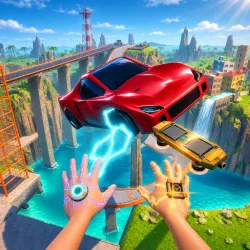
Explore Gravity Sandbox HD, grab and throw objects, drive vehicles, explore the Moon, and create your own physics playground.
CREATE YOUR OWN GRAVITY ADVENTURE
What happens when you get a huge island, two powerful gravity gloves, and complete freedom to experiment? Gravity Sandbox HD lets you discover a creative physics playground filled with vehicles, interactive objects, destruction, and unexpected experiments. Pick up almost anything, throw objects around, build your own setups, or jump into a vehicle and explore the world.
Grab, Build, and Experiment With Gravity
Each hand has a different ability, giving you plenty of ways to interact with the environment. Your left glove allows you to grab objects, carry them around, and throw them across the island. Instead of giving up, you can drag them across the ground and work toward upgrading your Mass stat. As your abilities improve, handling larger objects becomes easier. You can also hold an object in the air after carrying it for a short time, move it closer or farther away, and pin it in place.
Your right glove allows you to open a catalog and spawn objects, vehicles, and mechanisms wherever you are looking. You can smash walls, damage the trial house, and break objects by throwing heavy items at the island. If you prefer digging, grab a shovel or pickaxe and start making holes in the ground.
Exploration and Progression
You can enter different vehicles, including cars, boats, planes, and helicopters. Some vehicles even have detailed interiors that you can walk through. Once you are ready for a bigger adventure, take the shuttle toward the Moon, explore its craters under weak gravity, or leave the vehicle and float through open space. Grabbing, throwing, and creating objects help level up your gloves, while earned points can improve their range and mass. You will also encounter people living on the island and a zombie that actively chases you.
Tips for Better Sandbox Experiments
- Start with lightweight objects to understand how grabbing and throwing work.
- Upgrade Mass if you want to handle heavier objects more easily.
- Experiment with the distance wheel to position objects accurately.
- Use the Pin function to keep objects suspended while building setups.
- Explore the catalog regularly to discover useful items and mechanisms.
- Try throwing different objects at walls to see how they affect the environment.
- Use Repair World after large destruction experiments to reset your surroundings.
- Practice vehicle controls before attempting longer journeys.
- Explore the Moon when you want to experience a different movement style.
EXPLORE THE SANDBOX FEATURES
- Dual Gravity Gloves: Grab, carry, throw, and create objects using two different abilities.
- Object Catalog: Spawn items, vehicles, and mechanisms wherever you want.
- Physics Interaction: Experiment with object weight, movement, collisions, and gravity.
- Destructible Environment: Break walls and structures using objects and vehicles.
- Digging Tools: Use shovels and pickaxes to create holes in the ground.
- World Repair: Restore damaged environments whenever you want.
- Vehicle Collection: Drive cars, sail boats, and pilot planes, helicopters, and other vehicles.
How to Play
PC Controls
- WASD: Move
- Shift: Run
- Space: Jump
- Left Mouse Button: Grab objects
- F: Throw held objects
- Mouse Wheel: Move held objects closer or farther
- G: Pin objects
- Q: Open the catalog
- 1 to 4: Select favorites
- Hold Right Mouse Button: Prepare an item for placement
- Release Right Mouse Button: Place the selected item
- 5: Remove mode
- C: Undo the last creation
- Z and X: Remove or equip a ring
- E: Enter or exit vehicles and interact with buttons
- M: Open the map
- Esc: Open the menu
- Tab: Free the mouse cursor
Vehicle Controls
- WASD: Drive or control movement
- Space: Brake
- C: Change camera
- L: Toggle lights
- H: Horn
- R: Return vehicle
- F: Special action
- Arrow Keys and Z/X: Control mechanisms
- Right Mouse Button: Move upward while flying
- Left Mouse Button: Move downward while flying
FAQS
Does Gravity Sandbox HD have required missions?
No.
Can you travel to the Moon?
Yes. You can pilot the shuttle to the Moon.
How do you pick up heavier objects?
Use the left gravity glove to grab or drag objects.
Play Gravity Sandbox HD now and experiment with everything the island has to offer. Whether you enjoy creative building or chaotic physics experiments, check out similar challenges, including Animal Hospital 3D Sandbox and Car Sandbox: Crazy Descent.